


On 21 October 2026, the PHP team released a rather unusual security update. Two critical vulnerabilities, rated 9.2 out of 10 in CVSS 4.0, allow remote code execution on a server, without authentication. Nicknamed PHP2Shell, they leaked before the coordinated release, and Cloudflare was already reporting attack attempts before the fixes were even out.
An important point: the vulnerabilities are in PHP itself. Not in WordPress, not in a plugin, not in your code. Any PHP site that hasn't been updated is therefore potentially affected.
As usual here, we'll look at what happens under the bonnet: how these two vulnerabilities work, what the fix changes in php-src, and what to do if you can't update straight away. But first, a bit of context.
Why it's serious: PHP still runs a good part of the web
It sometimes feels as if PHP is a technology of the past. The figures say otherwise:
- 69.3 % of websites whose server-side language is known use PHP (W3Techs, 22 October 2026);
- WordPress, written in PHP, runs 39.6 % of all websites on its own (W3Techs, 21 October 2026). Drupal, Joomla, Magento, PrestaShop and hosting panels such as cPanel and Plesk also rely on PHP;
- 34.7 % of PHP sites still run on PHP 7 or an older version (W3Techs). Yet only the 8.2 to 8.5 branches still get regular maintenance from the PHP project (php.net). For PHP2Shell, the PHP team exceptionally released source patches for PHP 7.4, 8.0 and 8.1 (PHP announcement), and some distributions and LTS vendors offer patched packages, including for older versions (Ubuntu Pro, for example). Those sites still have to apply them.
The potential impact is as high as it gets. Unauthenticated remote code execution lets an attacker run whatever they want on the server, with the rights of the web process: read the database and configuration files (passwords, API keys), install a backdoor, inject malicious code into pages, or use the machine to attack elsewhere. On shared hosting, a single vulnerable site can expose its neighbours.
And the threat is not theoretical. Cloudflare says the vulnerability leaked before the planned release date, that it saw attack traffic targeting its customers and deployed firewall rules about nine hours before public disclosure (Cloudflare). According to the press, the DPG Media group took some of its sites offline as a precaution (ITdaily).
The essentials in one minute
- CVE-2026-109618 (GHSA-w8hw-w9fx-j79w): request state corruption during memory exhaustion.
- CVE-2026-109619 (GHSA-6wmf-4rv5-p3rp): global state that survives the end of a request, hence a use-after-free.
- Fixed versions: 8.2.35, 8.3.36, 8.4.27 and 8.5.12. The 7.4, 8.0 and 8.1 branches are no longer maintained, but the PHP team exceptionally released source patches for them.
- A single commit fixes both: 3584a98 "Avoid state corruption via bailout".
CVE-2026-109618: when running out of memory corrupts the request
The bailout, a very handy longjmp()... and a dangerous one
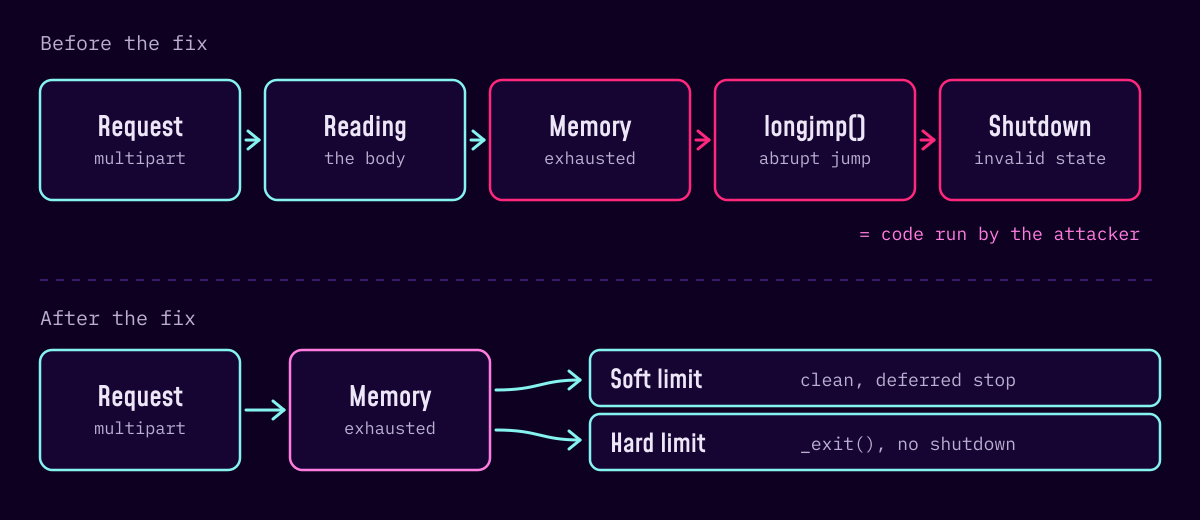
When a script exceeds memory_limit, PHP can't simply return an error to the function that asked for the memory: it abandons all the processing in progress. Historically, this "bailout" relies on longjmp(), which makes execution jump straight to a recovery point, without cleanly unwinding what was in progress.
The problem is when it happens. In some contexts, request memory is already visible before it has been fully initialised. If an allocation fails at that precise moment, the jump leaves this memory in an invalid state. The request's shutdown phase will then read it, or make decisions based on its contents. And the failing allocation doesn't even need to have anything to do with the corrupted area.
Triggering memory exhaustion with a multipart request
What remains is to make PHP run out of memory, remotely. The advisory describes several vectors, all in the multipart/form-data request parser (the main/rfc1867.c file), the one that handles forms with file uploads:
- a multipart request without a usable content length can get past the initial
post_max_sizecheck and keep sending data; - a multipart part can contain an unlimited number of headers, which take up much more space in PHP's memory than on the network;
- empty file fields don't count towards
max_file_uploads, but still create their metadata arrays, and nested field names multiply this work.
The result: a request that respects post_max_size can still reach memory_limit.
Not all servers are equal
With Apache and mod_php, shutdown is called even when request startup has failed. The request body is read during this startup, before any application code: full exploitation was validated over HTTP, with the default limits. With PHP-FPM, a failure at startup kills the child process, which limits the attack, but later memory exhaustion is still possible: the code is considered vulnerable, with no full exploitation demonstrated. FrankenPHP and LiteSpeed (LSAPI) are considered probably vulnerable.
CVE-2026-109619: the global state that outlives the request
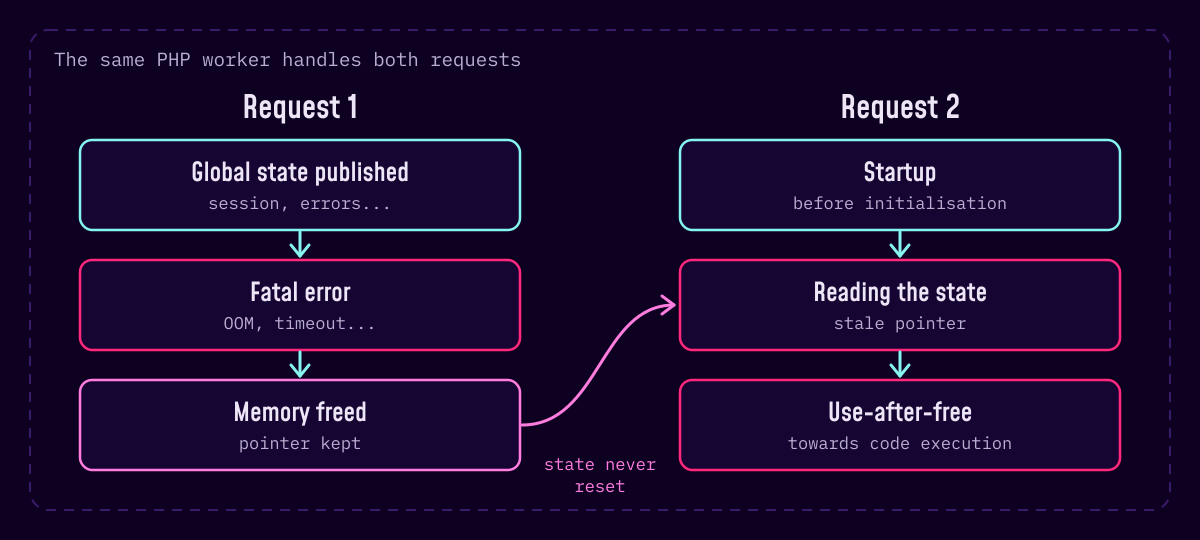
The second vulnerability exploits a different weakness. PHP keeps information belonging to the current request in global variables: errors, session, objects, extension data. They must be reset before the request's memory is freed.
If a fatal error interrupts an operation before this reset (memory exhaustion, execution time exceeded, compilation error...), the worker, which stays alive for the next request, keeps pointers to freed memory. All it then takes is for an operation in the next request to read this stale state before its normal initialisation: that's a use-after-free.
A fatal error isn't even required in every scenario: a simple warning raised during end-of-request cleanup, after the reset, can bring back an error state that points to request memory.
The advisory describes it as a two-link chain: a producer, which leaves stale state behind, and a consumer, which reads it too early. Two consumers have been confirmed:
- configuration diagnostics: a warning raised while applying an INI setting, before the engine is initialised, touches the error state. Under mod_php,
php_valuedirectives or those in a.htaccessfile are applied at that point. Hiding errors doesn't protect you: the access happens before the decision to display the message or not; - session upload progress (
session.upload_progress): PHP updates the session while reading the request body, before its normal initialisation, and can reuse state left behind by an interrupted request.
Under PHP-FPM, the validated scenario isn't quite the same as with mod_php. Since a failure at startup kills the worker, the stale state has to be published while the application is running, after a successful startup, and then a fatal error has to occur (in the advisory, memory exhaustion while processing the received data). The next request, if it lands on the same worker, then reads it back through upload progress. Exploitation therefore depends on a suitable application operation.
On PHP 8.5, the advisory also describes a particularly effective producer: with fatal_error_backtraces enabled, the backtrace of a fatal error is never reset at shutdown. An INI diagnostic in the next request reads this state back before initialisation: that is the basis of the confirmed code execution against mod_php.
What the fix changes
Commit 3584a98 fixes both vulnerabilities in one go. Its message sums up the idea in two lines: replace the bailout on memory exhaustion with an UnwindExit, and properly reset the globals that can be read at startup.
No more longjmp() on memory exhaustion
The memory manager (Zend/zend_alloc.c) no longer jumps just anywhere when memory_limit is reached. It now works in two stages:
- a soft limit: the error is recorded and handled at the virtual machine's next safe point, by cleanly unwinding the stack;
- a higher hard limit: if consumption keeps climbing, the process stops immediately with
_exit(), without ever running shutdown on a doubtful state.
The gap between the two can be tuned with a new directive, memory_hard_limit_percent. By default, the hard limit is 200 % of memory_limit below 1 GB, and memory_limit plus 1 GB above that. Tracking of the deferred error fits in a small structure added to Zend/zend_alloc.h:
typedef enum _zend_oom_state {

  ZEND_OOM_STATE_NONE = 0,

  ZEND_OOM_STATE_PENDING,

  ZEND_OOM_STATE_HANDLING,

  ZEND_OOM_STATE_HANDLED

} zend_oom_state;
The commit also introduces "fallible" allocations (femalloc(), ferealloc(), safe_ferealloc()...), which return NULL instead of triggering the fatal error. Code that knows how to handle a failure, such as the multipart parser, can then stop cleanly.
A stricter multipart parser
In main/rfc1867.c, the parser now only keeps the headers it needs and ignores duplicates. It also checks post_max_size against the bytes actually read, and no longer only against the length announced by the client.
A session that no longer trusts the past
In ext/session/session.c, the upload progress update is now marked by an in_rfc1867_update flag. During this phase, which runs before any user code is allowed, session objects remain __PHP_Incomplete_Class: no autoload, no __wakeup() or __unserialize(). And the session state is reset even when the previous request ended badly.
The rest of the commit is mostly more than 200 new oom_*.phpt tests, which deliberately cause memory exhaustion in just about every sensitive function: unserialize(), json_decode(), array_fill(), str_repeat(), the multipart parser... A good example of a fix that doesn't just plug the reported hole.
Can't update straight away?
Let's be clear: the only complete protection is updating, followed by a restart of all PHP processes. The official advisories do, however, suggest temporary measures. They reduce the risk without removing it.
Against CVE-2026-109618: memory_limit = -1, but not just any old way
It's counter-intuitive, but it really is the advisory's main mitigation: with no memory limit in PHP, there is no more bailout triggered by memory_limit. An allocation failure at system level can still take the vulnerable path, though; I'll come back to that below. It has to be enforced at administrator level, so that no pool, directory or application code can set a limit again:
; php.ini of the web PHP

memory_limit = -1


; pool PHP-FPM

php_admin_value[memory_limit] = -1


# Apache mod_php (VirtualHost, not .htaccess)

php_admin_value memory_limit -1
This setting comes at a price: PHP no longer protects the server at all against a script that's too greedy. So you have to make up for it elsewhere:
- keep a reasonable
post_max_size, and limit request size in the web server (client_max_body_sizefor Nginx,LimitRequestBodyfor Apache); - reduce
max_input_nesting_levelandmax_input_vars; - if the application doesn't use forms with file uploads, block
multipart/form-datarequests before they reach PHP;
If PHP runs in a container, you must add a memory limit to the container. With no memory_limit in PHP, that is what stops a script or a malicious request from eating all of the machine's memory. Depending on your tool:
# Docker

docker run --memory=512m ...


# Docker Compose

services:

  php:

    mem_limit: 512m


# Kubernetes

resources:

  limits:

    memory: 512Mi
The value is an example, to be adapted to your application. Without a container, a limit at cgroup level (memory.max, for example via systemd) plays the same role. That doesn't make it a protection against the vulnerability, though: the advisory points out that a cgroup limit does not guarantee that no allocation will fail. And when it is reached, the PHP-FPM master can be killed along with all its workers if they share the same container.
Watch out, there's a trap: don't use RLIMIT_AS or RLIMIT_DATA (for example via ulimit). They make mmap() fail at the limit, which triggers precisely the vulnerable path. Even with memory_limit = -1, an allocation failure at system level is still possible: that's why the mitigation is not complete.
Against CVE-2026-109619: switch off upload progress
The second setting targets the vulnerability's most direct consumer:
; php.ini

session.upload_progress.enabled = Off


; pool PHP-FPM

php_admin_flag[session.upload_progress.enabled] = off


# Apache mod_php

php_admin_flag session.upload_progress.enabled Off
No ini_set() or .user.ini here: the setting must be applied before the request starts. The upload tracking and cancellation features that rely on this mechanism become unavailable (PHP documentation), which affects few sites. The advisory actually recommends keeping it disabled even after updating, if you don't use it.
On PHP 8.5, add fatal_error_backtraces = 0, again at administrator level. And if performance allows, pm.max_requests = 1 in the FPM pool recycles each worker after a single request, which breaks the chain between two requests.
Restart and check
These settings are worthless until the workers have restarted: reload PHP-FPM or Apache, then check the value actually applied in each pool, for example with a temporary, protected phpinfo() page. The command-line binary (php -v, php -i) doesn't necessarily read the same php.ini as the web server's PHP.
A script to check your server
To save time, I wrote a small shell script that takes a first inventory of these points: php2shell-check.sh. It flags the settings to look at, but it proves neither that there is no vulnerability nor that the server is exploitable: its results need to be compared with your distribution's fixes and the configuration actually loaded.
Download the script to check your server
It doesn't change anything; it only reads versions and configuration. For each PHP installation it finds (CLI, PHP-FPM, including running processes, and mod_php), it looks at:
- the version, compared with the fixed versions of each branch, along with the distribution package if there is one;
- if the version is below the fix, the value of
memory_limit,session.upload_progress.enabledand, on PHP 8.5,fatal_error_backtracesin each PHP-FPM pool (included files too), takingphp_admin_valueandphp_valueoverrides into account; - for
mod_php, the same settings inphp.iniand every override found in the active Apache configuration, with its location, since it only applies to its own VirtualHost; - the container's memory limit, if it runs in Docker or Kubernetes;
- on a Docker host, containers that ship PHP without a memory limit.
Fetch it directly on the server, read it before running it (as with any script found on the Internet), then run it:
# Download

wget https://le-programmeur.com/static/neon/php2shell/php2shell-check.sh

less php2shell-check.sh


# On the server

sudo sh php2shell-check.sh


# Inside a container (Alpine images included)

docker exec -i <container> sh < php2shell-check.sh
Beware of backports: Ubuntu 24.04 fixes PHP2Shell in package 8.3.6-0ubuntu0.24.04.13, while PHP still reports version 8.3.6 (Ubuntu). A simple version number check would therefore give a false positive. The script knows the fixed packages published by Ubuntu and Debian, and compares the installed package version for the system's release:
/usr/sbin/php-fpm8.3 (PHP 8.3.6)

     package php8.3-fpm 8.3.6-0ubuntu0.24.04.13

[OK] package php8.3-fpm 8.3.6-0ubuntu0.24.04.13 includes the ubuntu noble fix (>= 8.3.6-0ubuntu0.24.04.13), even though PHP reports 8.3.6
For other distributions (Red Hat, AlmaLinux, Rocky...), whose fixed packages had not all been published at the time of writing, it doesn't draw a conclusion: it asks you to check with the distribution.
The exit code is 0 if nothing was found, 1 if there are points left to look at, and 2 only for a PHP version built outside a distribution, below the fix and with no workaround. Enough to plug it into a monitoring tool or Ansible, keeping these nuances in mind.
Its limits, to be clear. Outside Ubuntu and Debian, it doesn't know the state of backports. It reads files: an installation in an unusual path, an exotic include or an override set somewhere else can slip past it. And to know the value actually applied by the web server, phpinfo() remains the reference.
What next?
Update PHP as soon as possible, starting with all your Internet-facing servers. If you're on shared hosting, ask your host when and in which version they are applying the fix. And remember to check the versions that are really running, not just the ones you think you've installed!
It's also one of the reasons why the sites I build today with Søcle serve HTML pages prepared in advance: with no PHP behind the public pages, this kind of vulnerability doesn't affect them.
Would you like an outside view of your infrastructure or your code? Have a look at my code audit offer, or let's get in touch!
Sources
- Advisory GHSA-w8hw-w9fx-j79w (CVE-2026-109618), php-src
- Advisory GHSA-6wmf-4rv5-p3rp (CVE-2026-109619), php-src
- Commit 3584a98 "Avoid state corruption via bailout", php-src
- PHP 8 changelog
- Announcement of 21 October 2026, php.net
- Supported PHP versions, php.net
- Session upload progress, PHP documentation
- Cloudflare deploys protections against php2shell vulnerability, Cloudflare
- PHP2Shell vulnerability fixes available, Ubuntu
- CVE-2026-109618, Debian security tracker
- W3Techs: PHP usage and breakdown by version
- W3Techs: WordPress usage
- ITdaily: PHP2Shell, the PHP bug
- Hardware Cooking: critical PHP vulnerabilities, fixes released
- ForgetAboutIT: mitigation, CloudLinux and HardenedPHP