

My job is to automate whatever can be automated. For my clients, usually. For a long time, my own accounting was the exception: at the start of every month, the same ritual. The bank statement, entering everything in Dolibarr, the VAT, the returns, the ticking off... The shoemaker's children go barefoot, as they say.
So I got down to it. Today, my monthly close comes down to nine n8n workflows, a little well-placed AI and three human approvals. Let me tell you how it is built, what the AI does, and above all what it doesn't do. With screenshots!
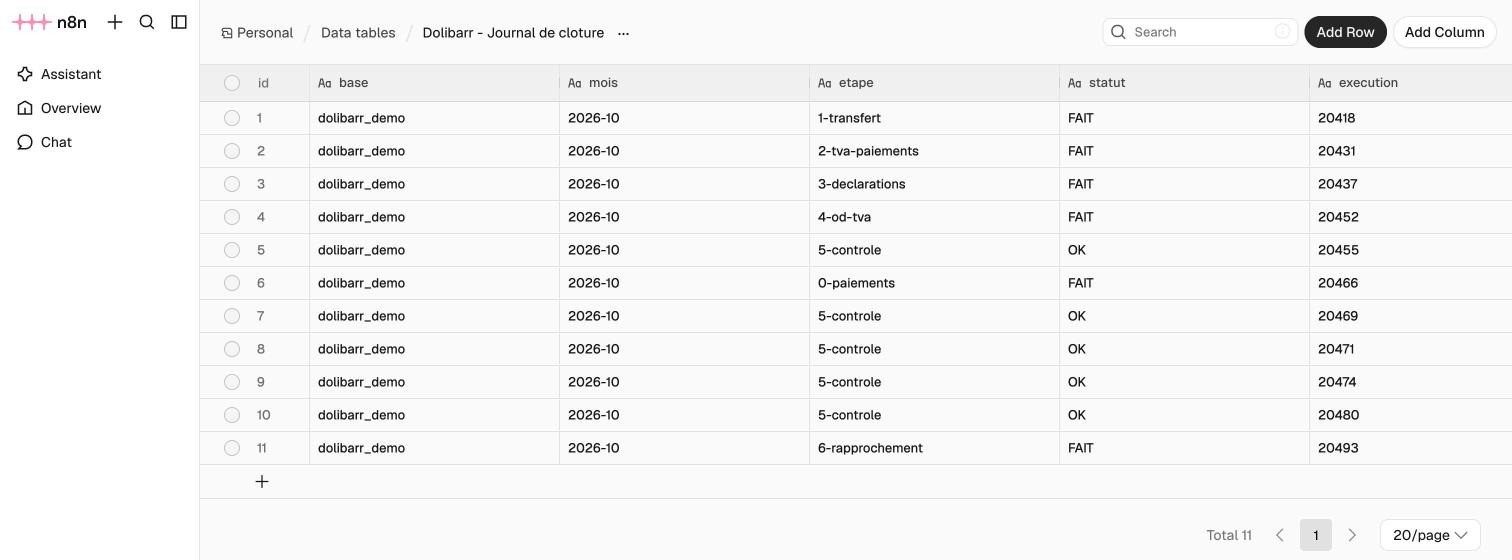
Most of all, I'll show you the most important step of the whole chain: a full check of the accounts, through an accountant's eyes, where the AI plays the auditor and tracks down the origin of every discrepancy.
All the accounting data shown in this article (amounts, accounts, dates, entry numbers) is made up.
The starting point
Every month, there is a bank statement in PDF, a VAT return (the French CA3 form) and an URSSAF return for social contributions. Between the statement and the returns, a good ten operations to chain together without a mistake. That is exactly the kind of work you can hand over to a machine... provided you pick the right one.
The tools
Nothing exotic, and almost everything is self-hosted on my own server:
- Dolibarr: the open source ERP that holds my invoicing and my accounting. This is where every entry ends up.
- n8n: the automation tool that orchestrates the whole chain. Each step of the close is a workflow.
- Nextcloud: my private cloud, where I keep the statements, expense receipts and returns. The workflows fetch their documents from there.
- MariaDB: Dolibarr's database, which the workflows query directly for the checks.
- OpenAI: the AI models n8n calls to read, classify and explain.
- Gmail: each step sends its summary e-mail there.
- Claude: Anthropic's assistant, which helped me write the workflows and which now runs the close with me.
Why n8n, and not "just AI"
The temptation right now is to hand everything to an assistant and ask it to "do the books". Let's be honest: that's a bad idea. A language model doesn't necessarily give the same answer twice in a row. And in accounting, an entry is not a suggestion: it is either right or wrong.
So I set myself a simple rule: everything that writes to the accounts is deterministic. These are SQL queries, calculations and checks written down in black and white in n8n workflows, hosted on my own server. Same statement in, same entries out. Every run is logged, and every node can be opened to see what went in and what came out.
Where AI belongs
AI is not absent, though. It steps in where it is genuinely good: reading, classifying and explaining.
- Reading the statement: the PDF text is extracted deterministically (with
pdftotext, which keeps the debit and credit columns apart), then an OpenAI model classifies each transaction: client payment, URSSAF contribution, subscription, expense claim... - Matching receipts: finding the invoice that goes with an expense, to recover the right VAT.
- Reading my returns: the amounts of the filed VAT return are read from the PDF to post the month's VAT entries.
- Explaining discrepancies: when an account doesn't balance, the AI looks for the reason, the way an auditor would.
But the AI suggests, and the code checks. The opening balance plus the transactions must land on the statement's closing balance, to the cent. An accounting entry must balance. If a check fails, the step writes nothing and the e-mail arrives with "ERREUR" (error) in the subject.
The chain, stage by stage
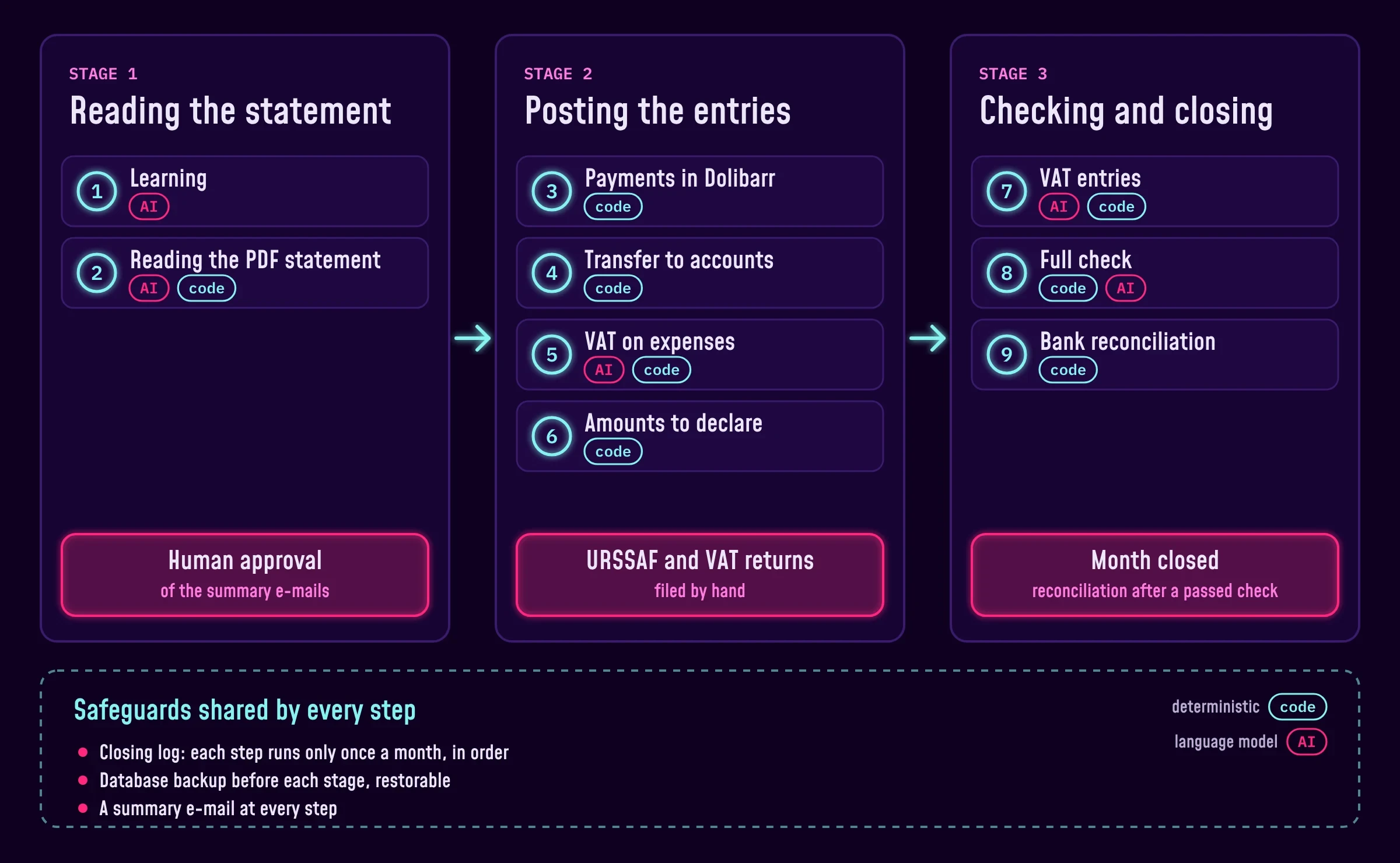
Closing a month is split into nine steps, grouped into three stages. At the end of each stage, I read the summary e-mails and approve before moving on.
Step 0: configuring the project
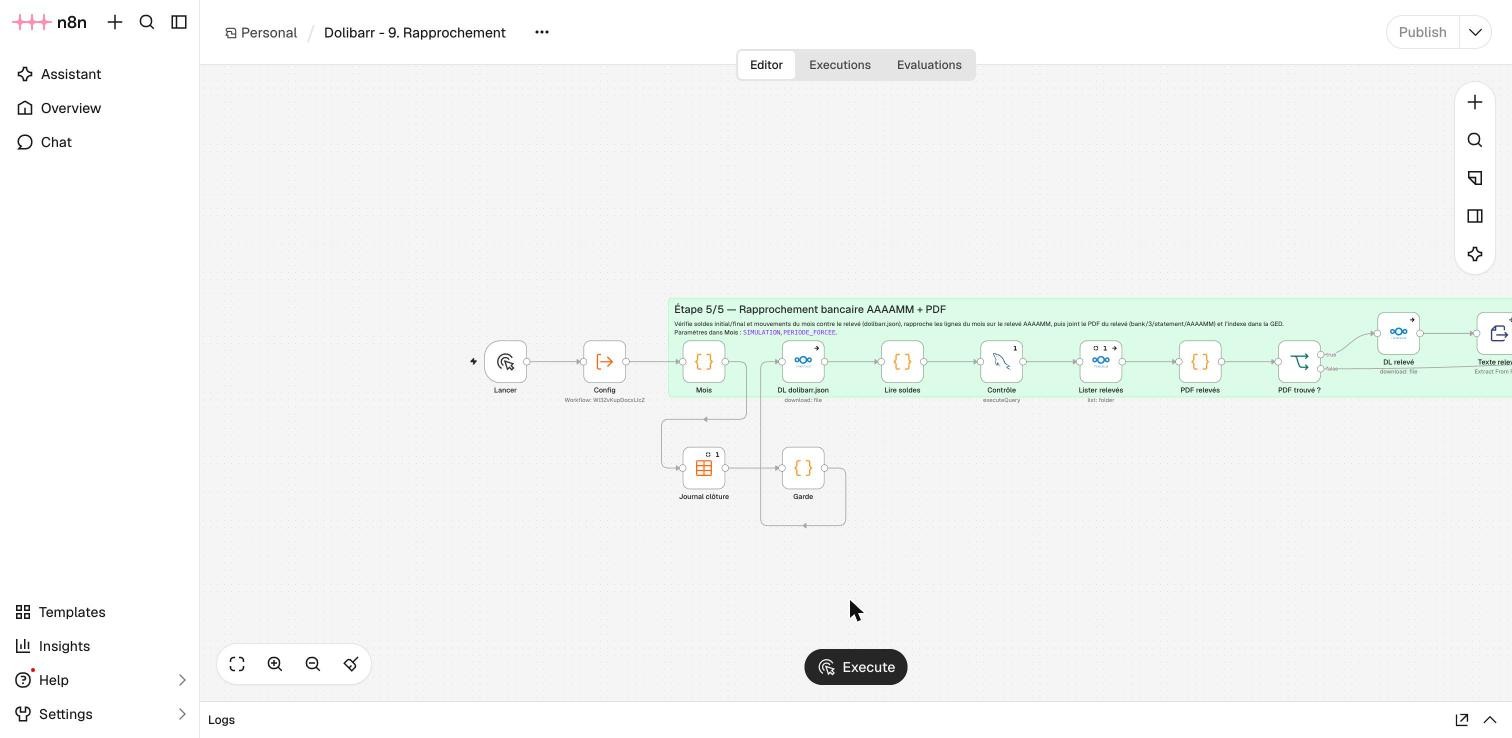
Before the first close, there is a configuration step. A "0. Config" workflow gathers all the shared settings: the Dolibarr database and its address, the bank account, the bank journal, the Dolibarr login used by the workflows, the expense types (URSSAF, CFE business tax), the Nextcloud folders for statements and returns, the backup folder, the AI model and its confidence thresholds, the address that receives the e-mails, the period to process and the simulation mode.
All the other workflows start by reading this configuration. The day I want to plug the chain into another company, this is the only place to change.
Stage 1: reading the statement
The first workflow maintains a learning base built from the statements and entries of previous months. The second reads the new statement, classifies the transactions and prepares a file for Dolibarr. Nothing has been written to the accounts yet: this is the time to check that every line was understood correctly.
Stage 2: posting the entries
The payments are created in Dolibarr with their receipts, transferred to the accounts, then the VAT of each expense is split out. The last workflow of the stage prepares what I have to declare: the turnover for URSSAF, and the lines of the CA3 in the exact order of the tax form, including the VAT credit carried forward from the previous month.
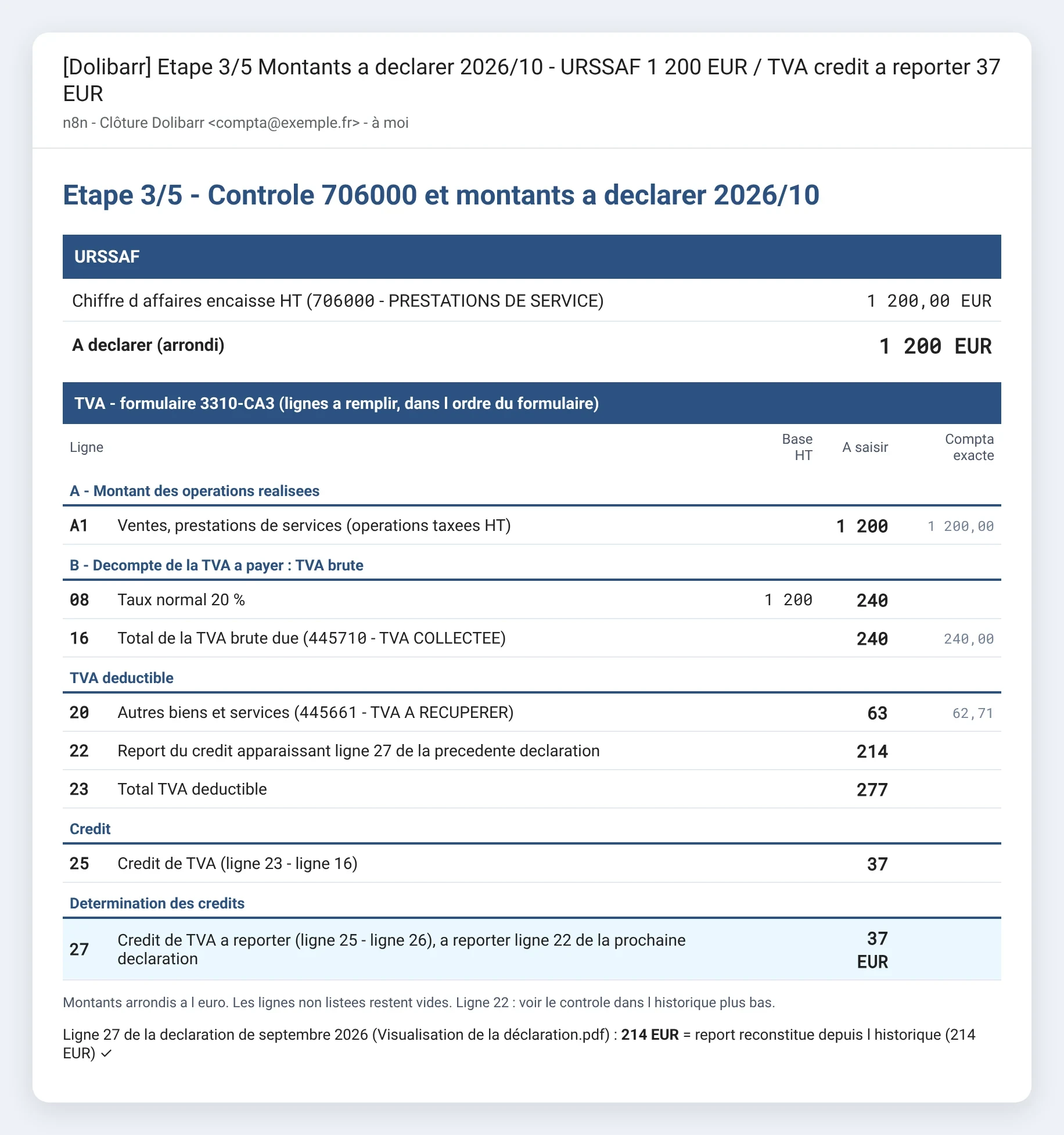
I file the returns myself. That's deliberate: the machine prepares the figures, but I'm the one who signs. Once filed, the PDFs go into Nextcloud, where the rest of the chain will pick them up.
Stage 3: checking and closing
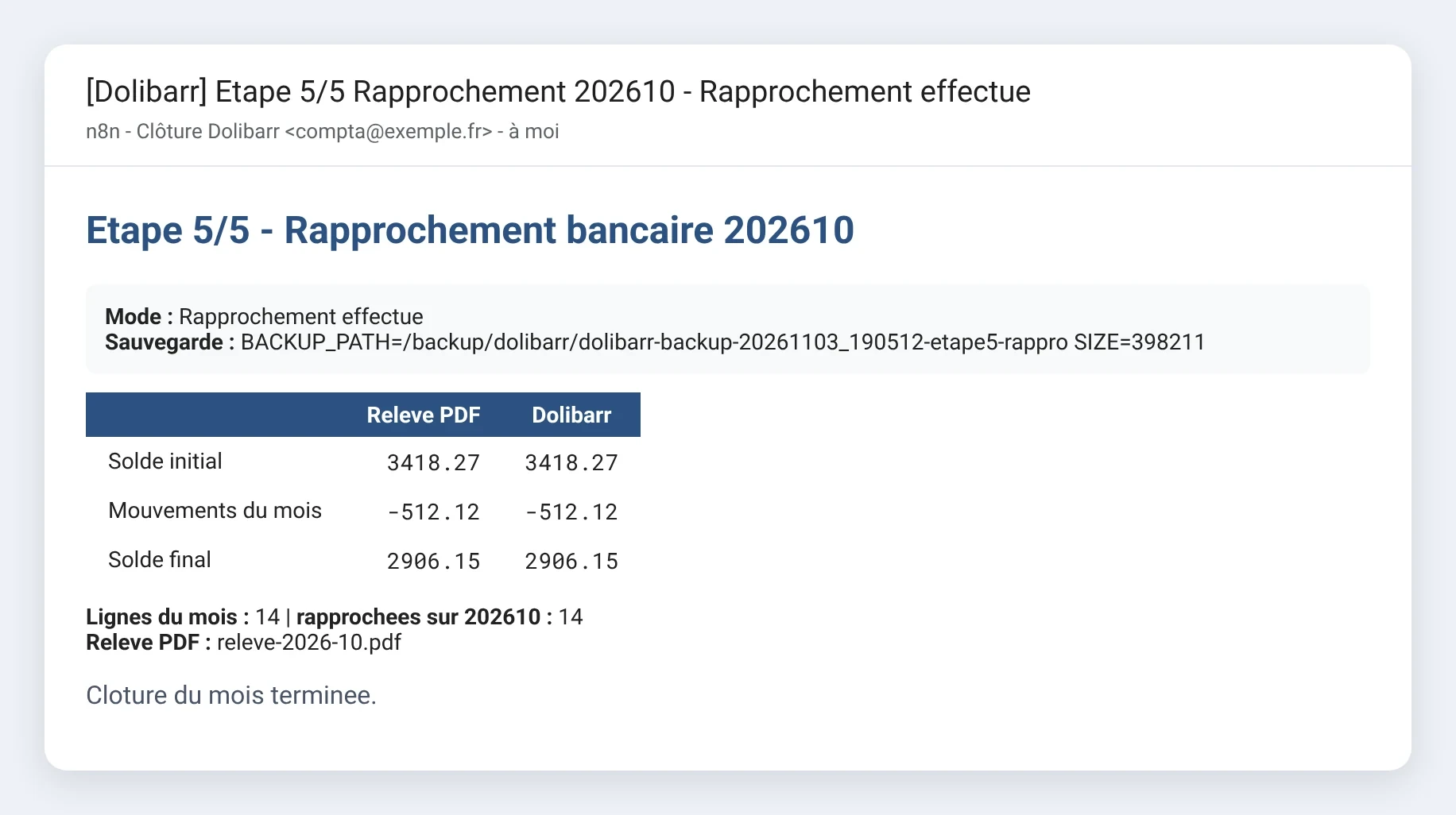
The next workflow reads the filed return and posts the month's VAT entries. Then comes the full check, followed by the bank reconciliation, which ticks off every line of the month against the statement and attaches the PDF in Dolibarr.
An e-mail after every step, which I check
This is the heart of the system. Each workflow ends with a summary e-mail: what was read, what was written, the checks that passed and the ones that failed, with a colour code. Green, all good. Orange, something to look at. Red, the step stopped without writing anything.
I read these e-mails before launching the next step. That's where I spot, if need be, a misclassified transaction, a missing receipt or a forgotten invoice. Nothing runs on its own from one stage to the next, and each e-mail ends with the step to launch next, so I never lose track from one month to the other. Along the way, I get a written record of every close in my inbox.
Safeguards everywhere
Automating your accounting is good. Not breaking it by rerunning a workflow by mistake is better. So I added several safety nets:
- A closing log: each step records that it was done for the month. Run it again and it stops with an error. And it refuses to start until the previous step is done.
- A simulation mode: the closing steps that write can do a dry run and send their e-mail without changing anything. That's how the whole chain was fine-tuned.
- Backups: the database is backed up before the entries are written, and a dedicated workflow knows how to restore it, putting the closing log back in the right state.
The full check, through an accountant's eyes
This is the most important step of the whole chain, and the one I'm proudest of. Before the bank reconciliation, a workflow goes through the whole month's accounts with a fine-tooth comb, the way a chartered accountant would before signing off:
- The bank: the statement is there, the opening and closing balances match between the statement and Dolibarr, every transaction is found.
- The entries: they balance, on accounts from the chart of accounts, with no suspense account and no duplicates.
- The VAT: every VAT reclaimed has its receipt, and the filed return matches the accounts, line by line.
- The returns: the month's URSSAF and VAT PDFs are filed in Nextcloud.
- The invoices: the ones that were paid are marked as paid, the overdue ones are flagged.
- The closing log: every previous step of the month is done.
Until this check is green, the bank reconciliation refuses to start.
It's the safety net of the whole chain: automated accounting is only worth something if you can prove, every month, that it's right.
For discrepancies, it puts the AI to work like an audit. The first time I ran it, it found a gap on my VAT payable account. No idea where it came from. I suspected an old opening balance, nothing more.
The audit rebuilt the whole chain of my returns since the accounts began, and found two causes:
- A forgotten debt: the VAT for the last month before my accounts started in Dolibarr, paid the following month. It had not been carried over at the opening: the payment existed, the debt didn't.
- A forgotten credit: a VAT credit I had forgotten to carry forward on an old return. In other words, VAT overpaid.
The important point is that the AI doesn't stop at a hunch. A deterministic calculation redoes the account reconciliation, line by line, and the remaining gap must come down to zero. Here, it comes down to zero. I posted the adjusting entry for the debt, and I still have to decide what to do about the credit.
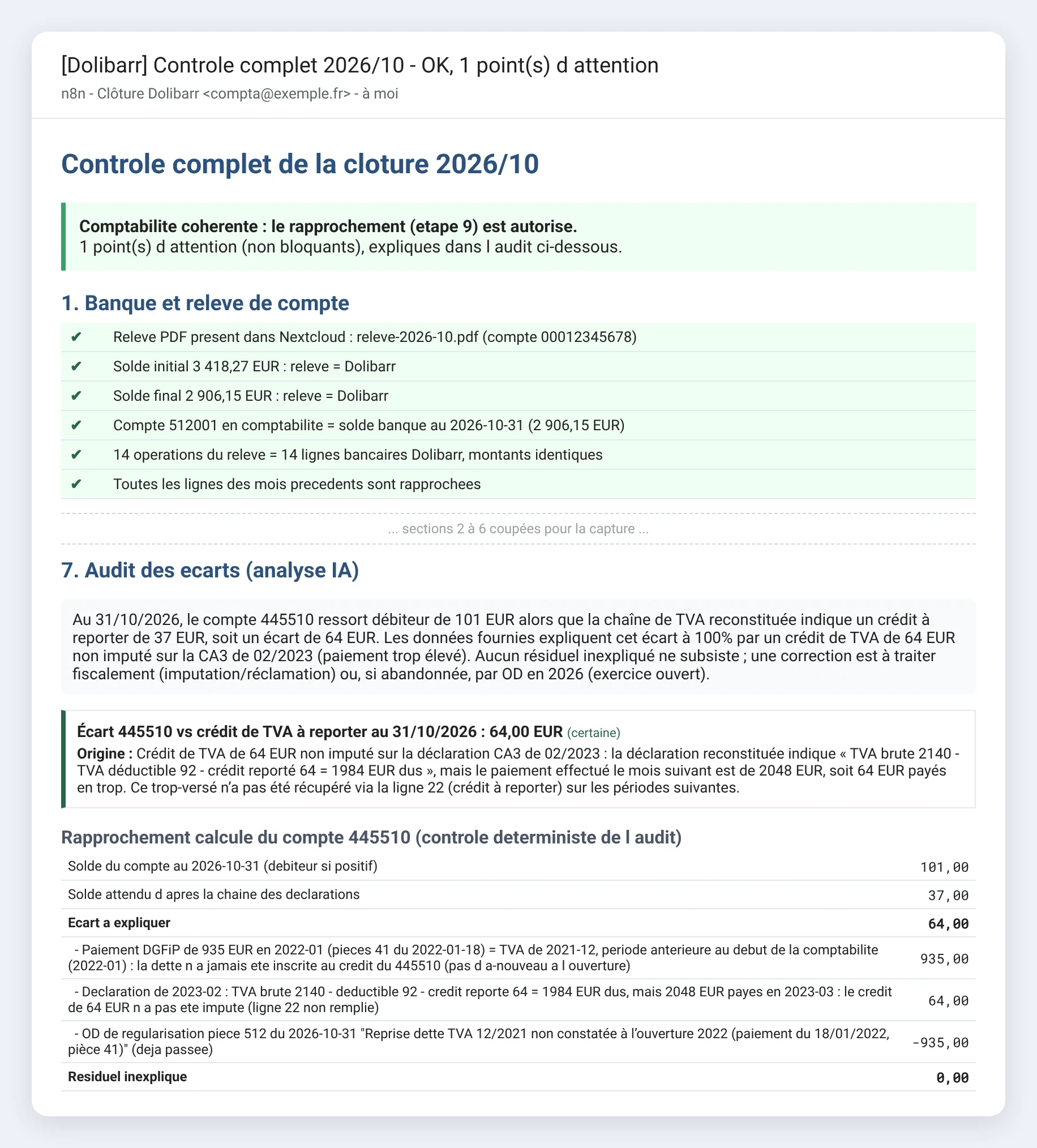
Known issues are handled too: an invoice I know the client can't pay right away shows up as information, not as an alert. The check doesn't cry wolf every month.
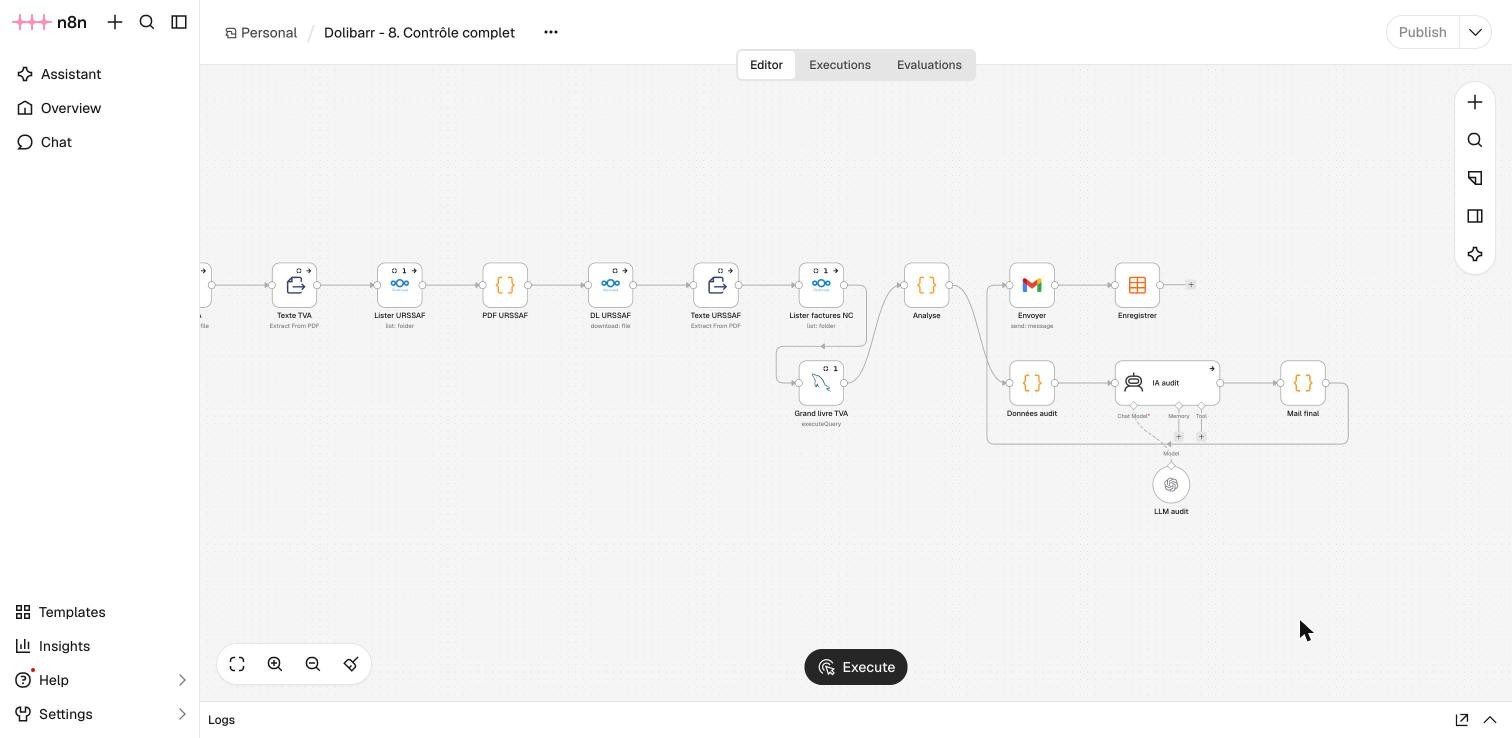
And now, I do my books by chatting with Claude
The latest piece, very recent: I no longer launch the workflows myself. I tell Claude "let's do November's books". It runs the workflows in n8n, reads the summary e-mails in my inbox, analyses them and stops at each stage for me to approve. If it sees an error or an anomaly it doesn't know about, it doesn't move on.
A good share of the workflows was actually written with Claude, then tested in simulation before touching the real database. As I explained in what cannot be delegated to AI, the assistant speeds up the writing a lot. The decisions remain mine: where to put AI, where definitely not to, and when to stop and check.
What I take away from it
- An accountant's check, every month. It's what makes the whole thing trustworthy, and it finds what you weren't looking for: a gap I couldn't explain, explained to the cent.
- Deterministic code to write, AI to read and explain. That's the rule that makes the whole thing reliable.
- One e-mail per step. I always know where we are, and every month leaves a trace.
- Simulation before the real thing. The whole chain did dry runs before writing a single line.
- Humans in the right places. Three approvals a month, no more, but no fewer.
What about you?
Accounting is just one example. The same principle works for many repetitive processes: data arriving as PDFs or e-mails, precise business rules, and someone who needs to stay in control. Want to automate a process like this with n8n, Python and well-supervised AI? I can help you design it, from the software architecture to going live. Discover my expertise, or let's get in touch!