
I have been monitoring servers for twenty years. My machines get the full treatment: memory graphs, an alert when a certificate expires in thirty days, the temperature of every disk. If a disk runs a bit hot, I know before it does. Me, on the other hand, nothing: three apps that don't talk to each other, each with its pretty curves, and no way to get anything out of them. The cobbler's children have no shoes, as they say.
Then I decided to lose a few kilos (or rather, IT WAS DECIDED that I'd lose a few kilos). I needed a coach that really knew my numbers: my nights, my activity, what I eat. Not an app that serves everyone the same advice, and not a coach that makes me feel guilty in front of a chicken with morels.
I first looked for an app that would do the job for me. There are loads, but none of them does everything. The ones that pull your wearables together don't read meals, the ones that count calories want a barcode, and almost all of them want a monthly subscription for data they keep on their side and that I can't query. Paying every month without having a hand on my own measurements? No thanks. So I got down to it.
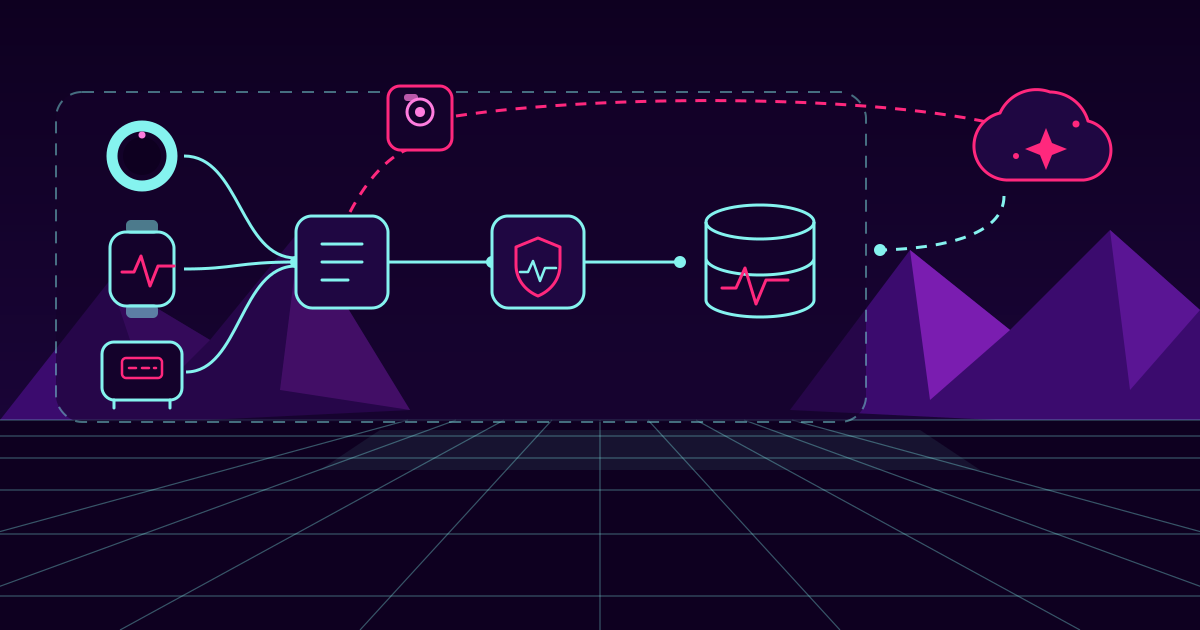
Here is how I put it all together. I describe the architecture I recommend for health data, with a medical model running locally. At home, lacking a beefy enough graphics card, the day-to-day coach goes through Claude for now: that's the simplified version in the guide at the end of the article.
The weight is blurred out (nice try ;) ) on the screenshots in this article, and the values in the database extract are made up.
The starting point
I have a smart ring for sleep and resting heart rate, a watch for activity, a connected scale, and an iPhone that gathers part of all that into Apple Health. Each with its own app.
I had data. The trouble was that it was scattered. Each app shows what it feels like, over the period it picked, and none of them answers the question I care about: does my Tuesday night have anything to do with what I ate on Monday evening? To find out, you need everything in the same table.
And this data isn't really mine anyway. The day a manufacturer changes its terms, shuts its API or goes under, the history goes with it.
The tools
Almost everything runs on my own server:
- Health Auto Export: the iOS app that reads Apple Health and sends the data to a webhook. It's the only paid piece.
- n8n: the orchestrator. It receives, normalises, inserts and alerts.
- MariaDB: the database that keeps everything, with a few tables and a view.
- llama.cpp: the server that runs the local models and exposes them over HTTP.
- MedGemma: Google's open medical model, which interprets the measurements.
- A remote vision model: only to read the meal photos.
- Telegram: the output. Two messages a day, no app to open.
The ground rule
Before writing the first workflow, I set myself a rule:
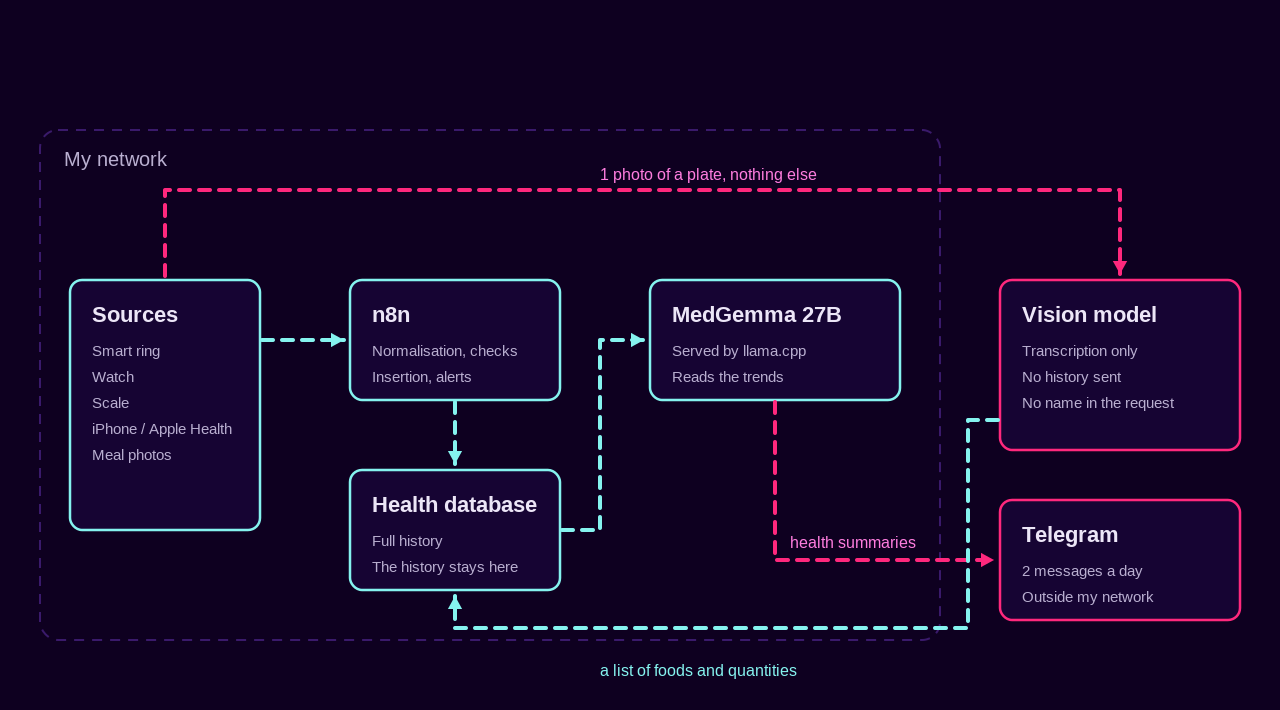
The full database stays at home. Each service only gets what it strictly needs for its task.
The first half goes without saying. The GDPR puts health data under article 9, alongside political opinions, and not by chance: a few years of sleep, weight and heart rate say far more about someone than a bank statement. When a free app collects all that, it has to make a living somewhere, and usually it's off its users.
The second half took more thinking. Doing everything locally on principle costs a lot of quality on some tasks. So I asked myself less whether anything left, and more what exactly left, and what could be done with it.
Two models, two jobs
The pipeline uses two models that do completely different work.
The first one reads numbers. It gets series: weight, sleep, resting heart rate, steps, intake. It looks for trends, for mismatches between the scale and the plate, for gaps worth a remark. It's the one handling health data, so in this architecture it runs locally.
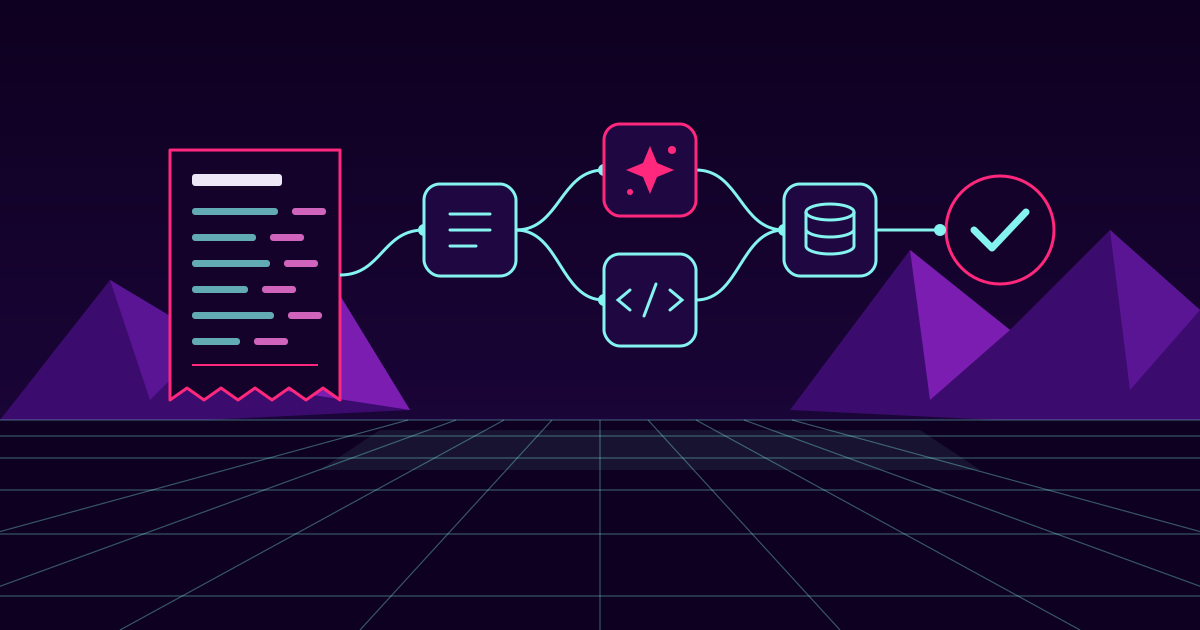
The second one reads images. You give it a photo of a plate, it returns a list of foods with estimated quantities, full stop. For that, I use a remote model, more capable than anything I can run myself. And it works out well: the chosen medical model can't read an image anyway.
The medical model, running locally
I went for MedGemma 27B, the text version of Google's open medical model: a Gemma 3 adapted to the medical domain (literature, clinical notes, exam questions). There are also multimodal versions, at 4B and 27B, built for medical imaging, which are no use here.
Compared with a general-purpose model of the same size, it brings the medical vocabulary and orders of magnitude: what a resting heart rate drifting by four beats means, the reference ranges of a blood panel, a saturation reading to be interpreted in light of the trend, the context and the sensor's limits. A word of caution though: its good scores on medical tests don't prove it will read your sleep curves any better. That's something to check on your own data.
It runs on llama.cpp, whose API is compatible with OpenAI's. In n8n, the HTTP node that calls it is the same as for a remote service, only the address changes.
One important point, written by Google: MedGemma is not meant to be used directly, without validation and adaptation to the use case. Its answers don't replace medical advice. What it produces here are remarks about trends.
Meal photos, handed to another model
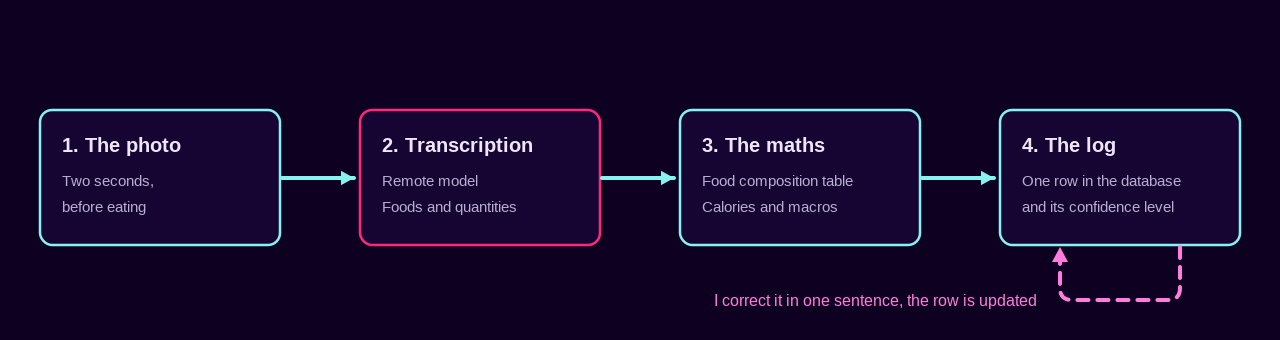
To track what you eat, the usual apps ask you to scan a barcode or look the food up in a database. Perfect for a supermarket yoghurt. But at home we cook nearly everything, and a homemade Comté tart has no barcode. And I am not about to stop making them just to please an app. The only habit I keep up over time is the photo: two seconds, before eating.
That left turning the photo into data, and that's where I gave up on doing everything locally. To recognise foods, an open model of 7 to 12 billion parameters does a decent job. To estimate a portion, much less so. You have to judge a volume in perspective, use the plate as a scale, know that a gratin is dense and a salad far less. Small open models tend to underestimate fat and get lost on composite dishes. And figures that look right but are wrong, I'd rather not have at all.
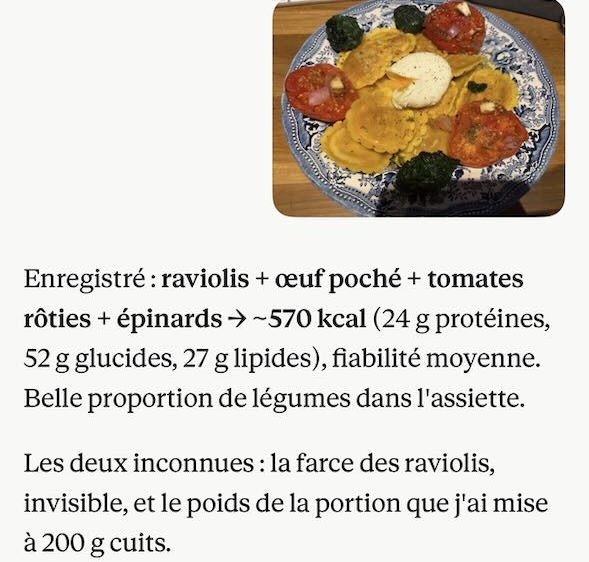
So this step goes to a more capable model, with a deliberately narrow brief: the goal is to transcribe, with no advice. An image in, and out comes just the list of foods with an estimated weight in grams, plus a confidence level.
I don't ask it for calories or macros. Those are computed in code, from a food composition table. Language models aren't reliable at adding up, and when they get it wrong, nothing tells you. A calculation, at least, I can check. It's the same rule as in my automated accounting close, where no model ever writes to the accounts.
What leaves, and what never does
This is the objection I hear most often, so let's be precise.
What leaves my network: the photo of the plate, with no name and no history, and the day's two reports. Those inevitably contain figures (weight, night, activity, intake) and go through Telegram's servers, which don't end-to-end encrypt conversations with a bot.
What never leaves it: the full database, with the whole history. With Claude, extracts go out with each report, but never the whole database.
As for the photos, the provider still knows which account is calling, and what it keeps depends on its offering. Over two years, it would learn that this account eats a lot of Comté. Guilty as charged. What it wouldn't know is what I weigh or how I sleep.
I'd rather have this trade-off, written down clearly, than an all-local stance on principle that would give me wrong portions.
The ingestion chain, in short
- The phone sends, the server waits. Health Auto Export regularly pushes the data to an n8n webhook. No Apple credentials stored anywhere, no token to renew. If the phone is offline, it catches up on the next pass.
- Units to line up. Apple Health sends each measurement in its own units: energy in kilojoules, sleep in decimal hours, weight in kilos.
- Timezones. I got caught out before finding the right rule: the time is stored in universal time, and the local day is computed once, at insertion. Otherwise a query like "how many steps yesterday" goes wrong twice a year when the clocks change, and a little every night between midnight and two in the morning.
- A few tables and a view. The raw points, one per measurement, which nobody touches again. The workouts. The meals, with the detail of the foods and the computed macros. And a view that summarises each measurement per day (total, average, minimum, maximum, number of points).
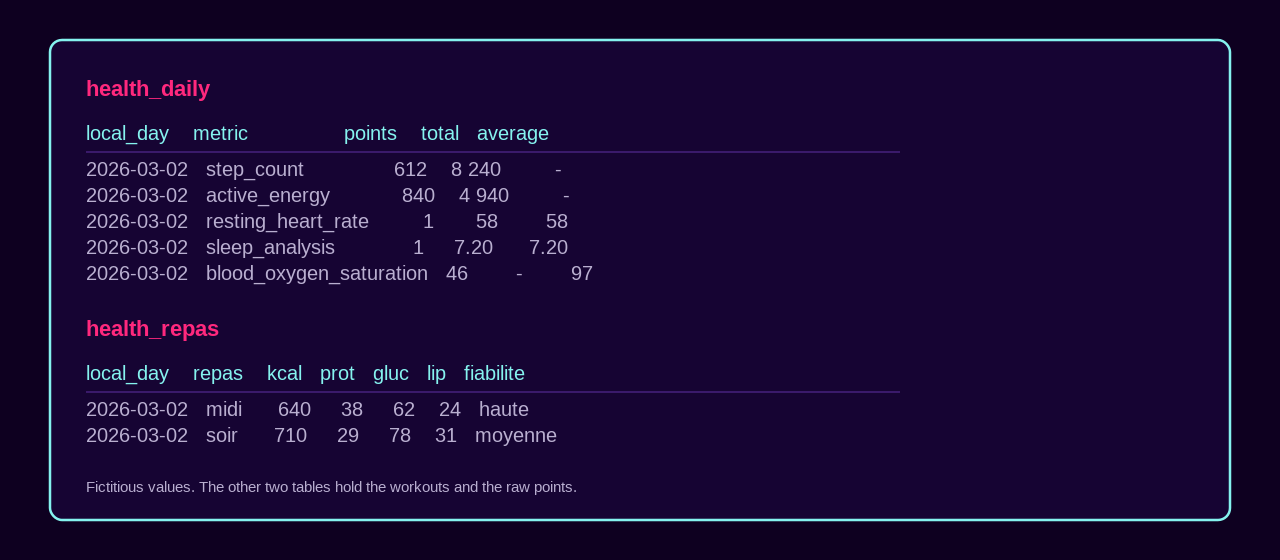
For the daily summaries, a simple SQL view does the job. All the report queries go through it, instead of rewriting the grouping in every query. Heart rate alone is 150 to 200 points a day: you might as well write that calculation once and for all.
The hardware you need
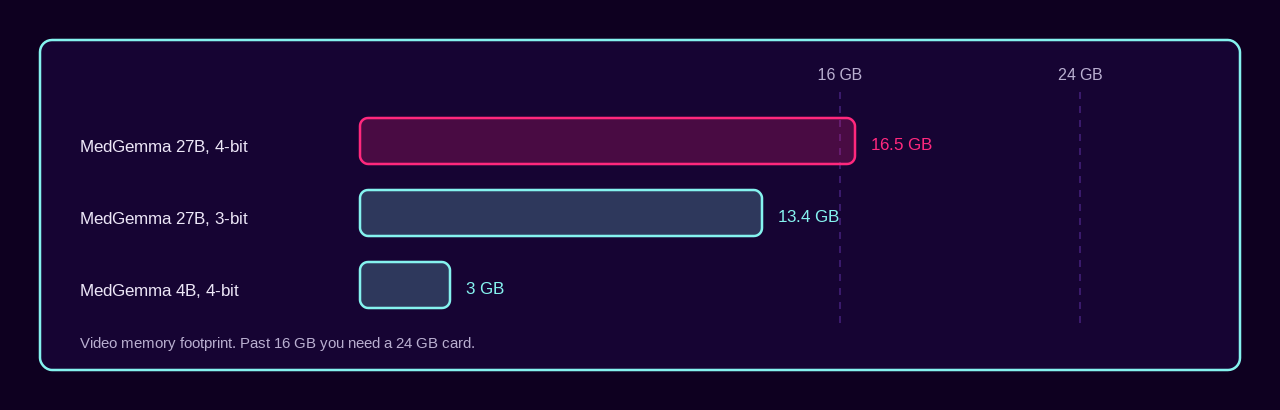
For anyone wanting to reproduce the local part, a few figures. MedGemma 27B quantised to 4 bits weighs about 16.5 GB: count on a 24 GB card to work with a comfortable context, or a split between card and CPU, which is slower. These figures are indicative: the memory actually used also depends on the context length. At 3 bits it drops to 13.4 GB and fits in 16 GB of video memory, with a loss of finesse that remains acceptable for reading trends. The 4-billion-parameter version runs just about anywhere.
The amount of video memory often matters more than the age of the card: llama.cpp can make use of older cards, as long as they have enough memory. And it's memory bandwidth that sets the generation speed, far more than compute power, because every word produced means reading all of the model's weights again. For two reports a day, speed hardly matters: even a slow answer is plenty.
A few traps
- Duplicates. Health Auto Export happily re-sends the same points. Each measurement is identified by its type and its time, so a duplicate has no effect. This key assumes a single point per type and per time, which is the case with my export. Whatever you do, leave the source out: the app stores the list of devices there, which changes from one sync to the next, and you would end up with steps counted twice.
- SQL on a single line. On my instance, the n8n MySQL node stripped the line breaks from queries passed as a parameter. I found out while trying to work out why a query returned nothing...
- Summaries before joins. In my case, a join on the raw points table with a grouping on a structured-data column never finished running.
- Nothing goes in quietly. Every detected meal carries a confidence level and triggers a message I can reply to with a correction. My correction updates the row.
Two messages a day
All of this ends up as two Telegram messages, one in the morning and one in the evening.
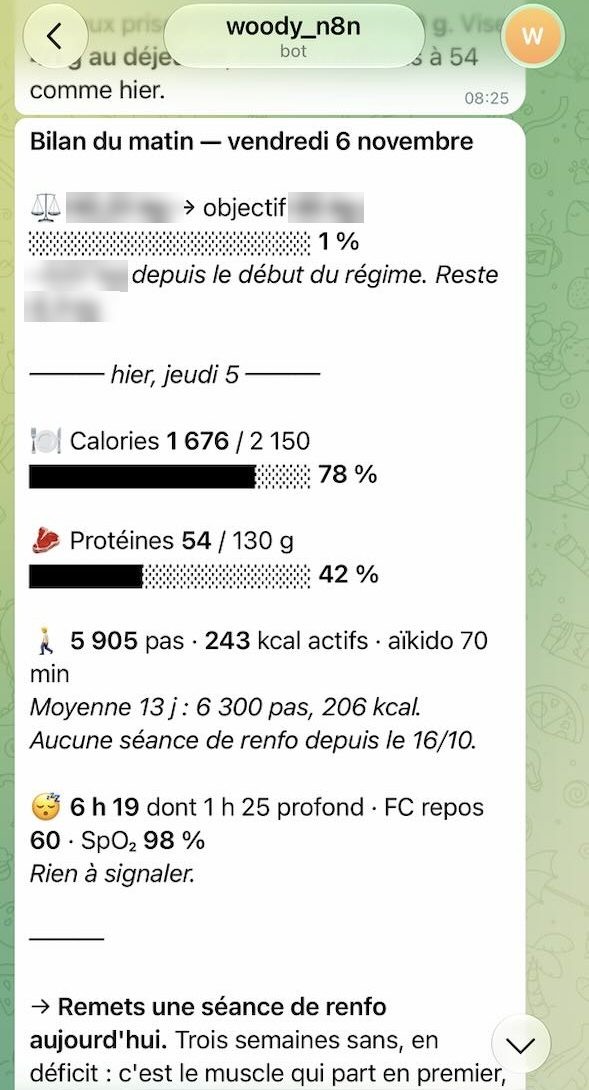
The morning one arrives at 11am. I had first planned it for 7am, but the night's data only reaches Apple Health later in the morning: at 7am, the message talked about the previous day with holes in it, not ideal to start the day. Moving it by four hours improved the reports more than all my tweaks to the model's instructions.
Inside: the weight and the gap to the target, the previous day's totals, the activity, a progress bar (full and empty characters in a code tag, so Telegram shows it in fixed width), and a single recommendation, when it changes something. Ten lines at most: any longer and I wouldn't read it.
The AI adjusts the calorie target to the day's activity.
Does it work? Find out in a few months ;)
What it changed
Not what I expected. I thought I would get something out of the curves. It actually comes from elsewhere.
First, just taking the photo. It makes you look at what you're about to eat before eating it, and I think half the effect of the tracking comes from there, with no technology involved. Incidentally, my plates have never been photographed so much.
Second, the chance to be wrong. I had ideas about what triggered certain digestive troubles. With the meals and the symptoms in the same database, mostly I found out that two of those ideas didn't hold. Not much fun, but useful.
What if I don't have a local AI?
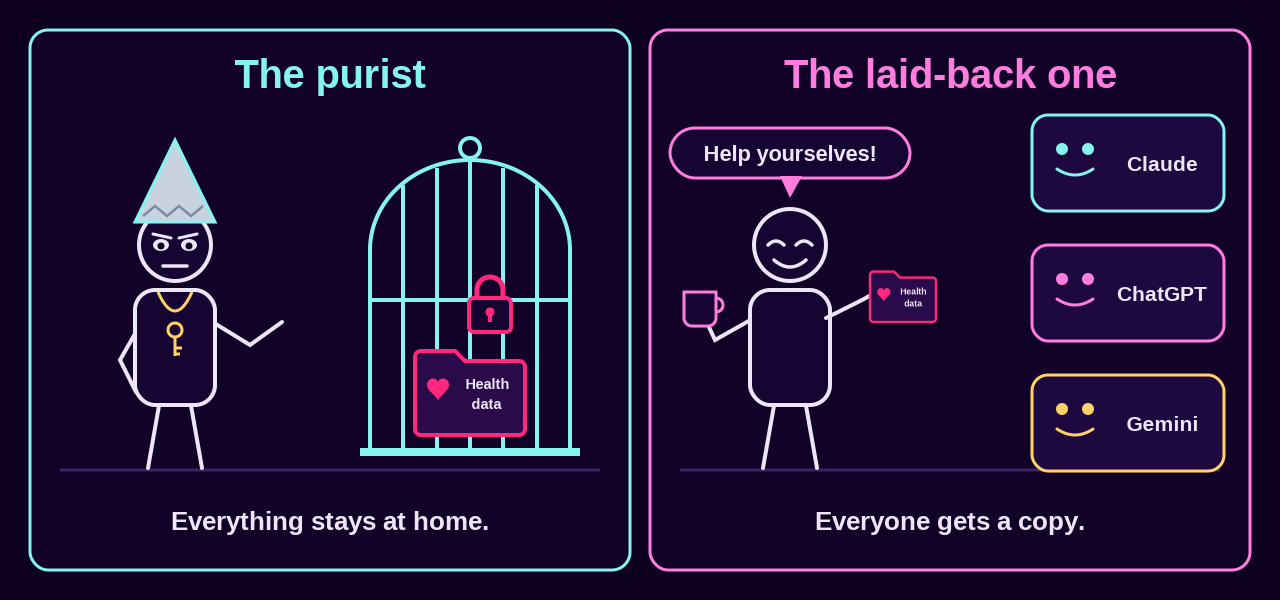
When it comes to data privacy, there are purists, and there are people who couldn't care less. Both exist, and this setup has to work for both.
I get asked this a lot, and it's a fair question: the local part needs a graphics card, a server that's always on and the willingness to look after it. Without all that, the pipeline still works. You just need to know what you're changing.
Technically, it's very simple. MedGemma sits behind an OpenAI-compatible API: to switch to a large hosted model, you change the address and add a key in the n8n HTTP node. The ingestion, the database, the checks, the two messages, nothing else moves. A large hosted model may even give better results, something to check on your own data.
The perimeter, on the other hand, changes: with every report, your weigh-ins, your nights and your heart rate go to the provider, tied to one another.
If you make that choice, and it can be perfectly defensible, a few precautions limit the damage:
- Send summaries, not raw points. A weekly average and a trend are enough for a useful remark. Three months of minute-by-minute heart rate are not.
- Send no identifier. The model doesn't need to know who it's talking about to see that a curve is rising.
- Read the retention terms. A paid offering where your data isn't used for training is not at all the same as a free consumer app, even when both call the same model. And those terms can change, while your data will already have gone.
- Keep the database at home. Even if the analysis goes out, the storage has no reason to follow. You can always change your mind later.
And if it's the hardware holding you back rather than the principle, the medical model also comes in a 4-billion-parameter version. It runs on just about any recent card, and even on a CPU if you're patient. It's less sharp than a large model, but to tell you "your weight isn't moving although your intake has dropped", it's more than enough.
Fancy your own health coach? Here's how
Simplified version, with Claude and n8n
No local medical model and no graphics card here: Claude plays the coach. So your history goes to Anthropic with every report, it's the "laid-back" version from the comic just above. In return, there's no compute server to set up.
You'll need: an iPhone with Apple Health, the Health Auto Export app (paid), an n8n instance, a MariaDB or MySQL database, a Telegram bot, and the Claude app connected to your n8n.
1. The database
Create a database with at least three tables:
health_metrics: one row per measurement, with the measurement name, the time in UTC, the local day, the source, the unit, the value and the original JSON. Unique key on the name and the time, without the source (see the traps above).health_workouts: the workouts, with their start, duration and type.health_repas: the meals, with the description, the list of foods as JSON, the calories, protein, carbohydrates, fat and a confidence level.
Add a health_daily view that summarises each measurement per day: that's what the reports will read. The full script creates the database, the tables (plus one for ECGs, if you record them) and the view. The column names are in French, as in my setup.
Download the database structure (.sql)
2. The ingestion workflow in n8n
Four nodes, no more:
- Webhook on POST, protected by an authentication header (for example
X-Token), so nobody else can write to your database. - Code: it converts the dates to UTC, works out the local day, splits sleep into phases and blood pressure into systolic and diastolic, then builds batches of
INSERT ... ON DUPLICATE KEY UPDATE. - MySQL: it runs those queries, with the values passed as parameters.
- Respond to Webhook: it answers the phone with the number of rows received. Handy to check everything gets through.
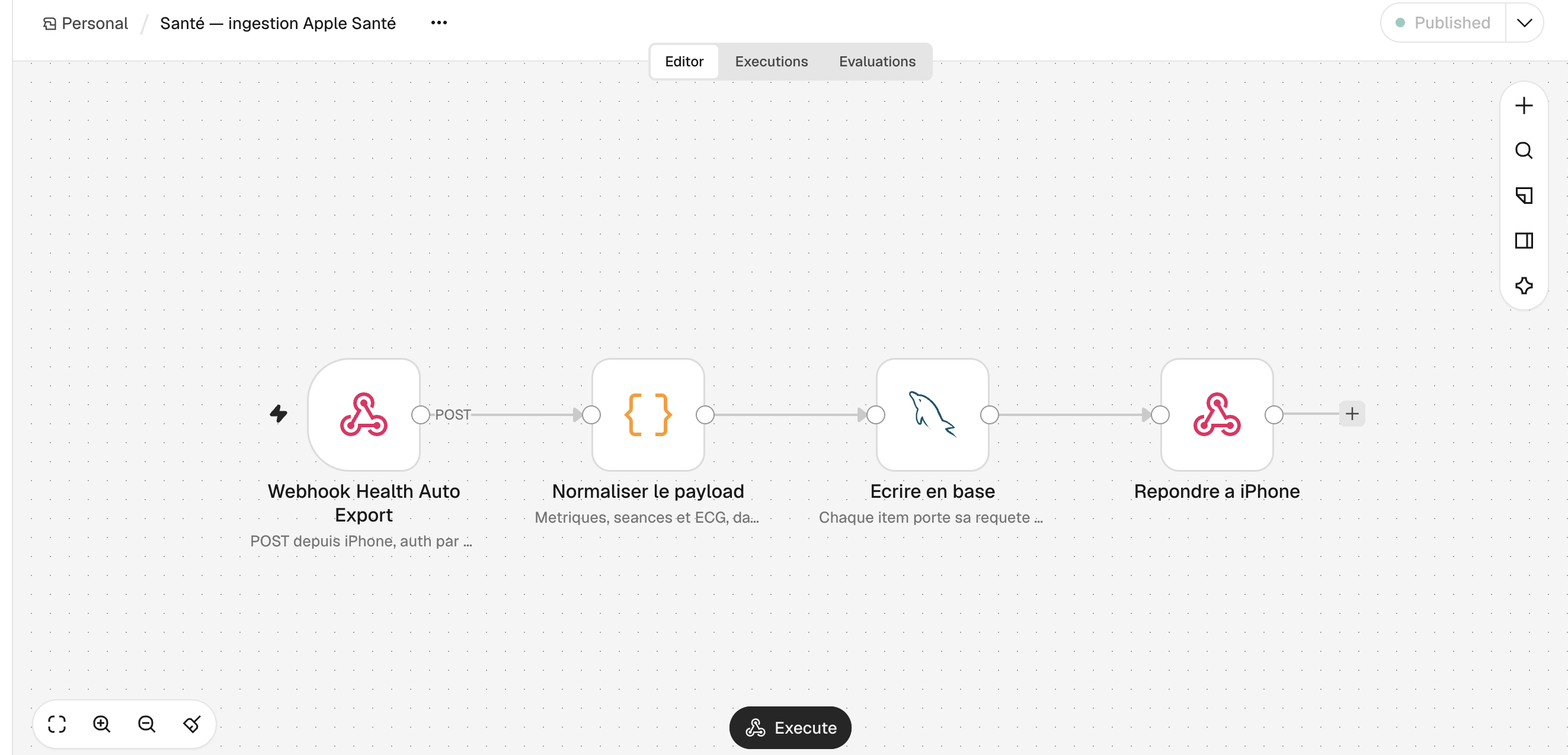
You can also import my workflow as it is into n8n (Import from File), then pick your own credentials for the header and for MySQL. It writes to the sante database created by the script above.
Download the n8n workflow (.json)
3. Health Auto Export
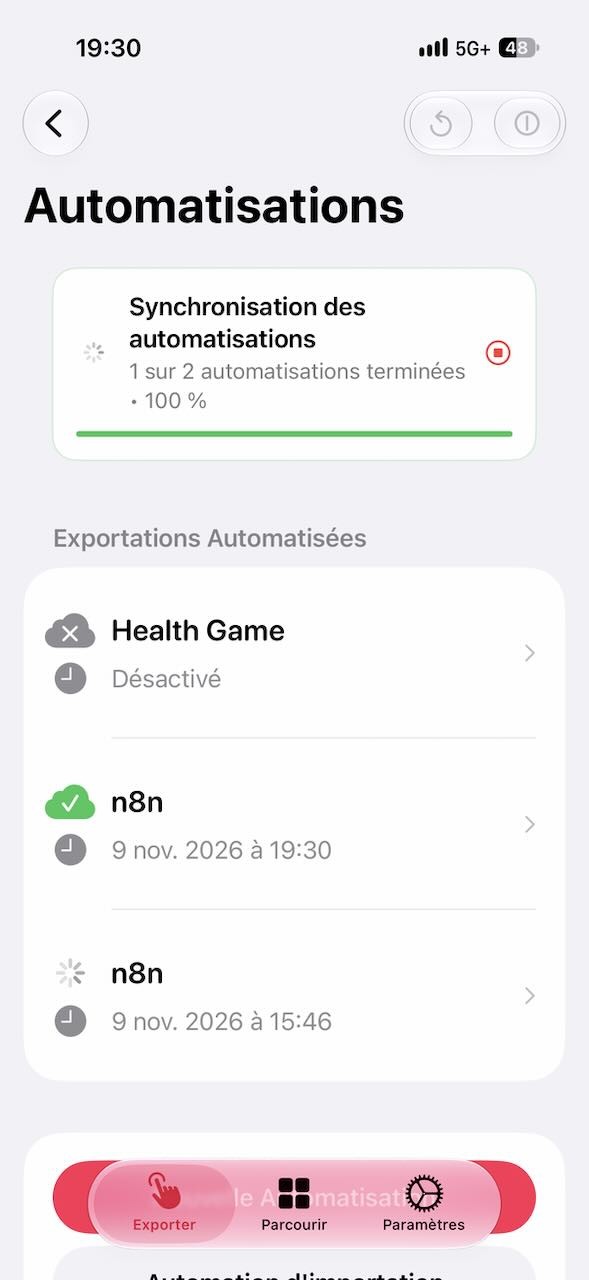
In the app, create an automation that exports to a REST API: your webhook address (something like https://n8n.example.com/webhook/coach-sante-ingestion), JSON format, your header with its token, and the data to send: weight, steps, sleep, heart rate, active energy, workouts.
4. Two "notepad" workflows
This is the trick that lets Claude work without knowing your database credentials. To give it access, enable n8n's built-in MCP server in the instance settings, make these two workflows available to MCP, then add that server as a connector in Claude.
- SQL queries: a manual trigger, then a MySQL node. Claude writes its query there, runs the workflow and reads the result.
- Telegram sending: a manual trigger, then a Telegram node in HTML mode. Claude writes the message there and sends it.
The bot token and the database password stay in n8n's credentials. Claude never sees them. It can, however, run any query it likes: give n8n's MySQL account only the rights the coach needs, reading the measurements and writing the meals.
For the bot, message @BotFather on Telegram: the /newbot command gives you a token, which goes into n8n's Telegram credentials. Then get the ID of your conversation (the chat id), for example with @userinfobot, and put it in the Telegram node.
SQL workflow (.json) Telegram workflow (.json)
5. The skill
A skill is a file of instructions that Claude rereads for every report. Put in it:
- where the data lives: the SQL workflow, the tables and their columns;
- the constraints: queries on a single line, times in UTC, table names prefixed with the database;
- your targets: calorie target, protein floor, goal weight, and how exercise moves the target;
- what goes in the two reports and their Telegram format;
- the ground rules: state what was estimated before writing to the database, and correct the row when you push back.
An extract, with example values:
## Targets
Target: 2,000 kcal a day · protein: at least 120 g

## Morning report (11am)
1. Weight and 7-day rolling average
2. Night: duration, deep sleep, resting heart rate
3. Yesterday's activity: steps, active energy, workouts

## Sport and calorie target
Workouts: the ones from the watch (health_workouts),
plus the ones I log by hand (aikido, hiking...)
Normal day: the target doesn't move
Big day (active energy > 14-day average + 100 kcal):
   add HALF the gap, the sensors overestimate
Never lower the target on a quiet day
Always put a figure on the adjustment in the report

## Evening report (9pm)
Calorie and protein bars, verdict in one sentence
The full template is ready: tables, SQL rules, exercise, message format, meal handling. Replace the values in brackets with your own, then add the file to your skills in Claude.
Download the skill template (.md)
6. Scheduled reports
In the Claude app, create two scheduled tasks, at 11am and 9pm, that run the skill. Claude reads the database, does the maths, writes the message and sends it on Telegram.
7. Meals
Take a photo of your plate and send it to Claude. It lists the foods, tells you what it estimated, you correct it if needed, and it writes the row to health_repas through the SQL workflow. By the evening, it's all in the report.
What about you?
If I had to keep only two lessons: look after the database before thinking about models, and for each task, look at what leaves your premises rather than choosing between "all local" and "all cloud".
Health is just one example. If your data is scattered across apps that don't talk to each other, whether it's production, accounting or clients, the recipe is the same: a database you control, an orchestrator, and AI only where a piece of code won't do. As I wrote about what cannot be delegated to AI, architecture work is mostly about deciding where AI belongs.
These are the kinds of systems I design and put into production for my clients, from the software architecture to deployment. Discover my expertise, or let's get in touch!